
V-Stack
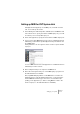



Table Of Contents

V-STACK
4 – 44 Setting up your system
The “Active ASIO Ports for Data only” setting
If you are sending huge amounts of MIDI data at once, there is a small
possibility that you might run out of bandwidth on your VST System
Link network. This will manifest itself by notes “choking” or timing be-
coming erratic.
If this happens, you can devote more bandwidth to MIDI by selecting
Active ASIO Ports for Data only in the VST System Link Setup panel.
When this is active, the VST System Link information will be sent on
the entire channel instead of just one bit, more than enough for all the
MIDI you could ever hope to use. The downside is that you can no
longer use this ASIO channel for audio transfer (do not connect it to a
speaker!), thus leaving you only 7 channels of audio in our ADAT ca-
ble example. Depending on how you work this might be a reasonable
compromise.