
V-Stack
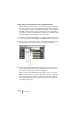

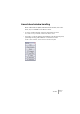
Table Of Contents

V-STACK
6 – 62 VST Instruments
Setting a key zone and transposition for your VST Instrument
When loading a VST Instrument, you can specify a key zone that will
be used to play the notes for the VST Instrument and also its transpo-
sition. The key zone setting works like a filter (similar to the settings for
the MIDI port and channel): only notes falling into the specified key
zone will be routed to the VST Instrument. These notes will be played
using the transposition settings. Proceed as follows:
1. Load the desired VST Instrument in a slot in the VST Instruments win-
dow and specify the desired MIDI port and MIDI channel (see above).
2. Specify a key zone by clicking on the Lo Key and Hi Key value fields
and selecting a note value from the pop-up menus that appear.
3. Specify the desired transposition by clicking on the “Semi.” and/or
“Octa.” value fields and selecting a transposition (± 11 semitones or
± 5 octaves) from the pop-up menus that appear.
When you stack several VST Instruments that receive on the same
MIDI port and channel, you can use different key zones to trigger dif-
ferent VST Instruments. When you want the instruments to play the
same notes simultaneously, simply leave all key zone and transposi-
tion settings as they are.