
V-Stack

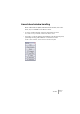
Table Of Contents

V-STACK
VST Instruments 6 – 65
Common settings in the control panel
Although the parameters are different for different VST Instruments, all
control panels have a common area at the top (Windows) or bottom
(Mac OS X). Here you can do the following:
• Turn the VST Instrument on or off by clicking the power button.
• Select a patch by using the patch pop-up menu or the arrow buttons.
These are the same as in the slot in the VST Instruments window.
• Name a patch you have created by typing a new name in the name
field (patch pop-up menu).
The settings you have made are automatically saved with the project, regardless of
whether you name it or not.
• Save the settings you have made as a program file, by selecting “Save
Instrument” from the File pop-up menu.
This saves the program on disk as a separate file (extension “.fxp”), allowing you to
load it into the VST Instrument at any time. You can also save the complete set of pro-
grams currently in the VST Instrument by selecting “Save Bank”.
• Load programs from disk by selecting “Load Instrument” or “Load
Bank”.
If you load a bank, it will replace the current set of all VST Instrument programs. If you
load a single program, it will replace the currently selected program only.