
V-Stack

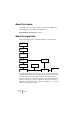
Table Of Contents

V-STACK
7 – 68 The Mixer
About this chapter
This chapter describes how to mix the sound from your VST Instru-
ments, adjusting level and pan and adding EQ.
• Effect handling is described on page 105.
About the signal flow
The following figure shows a simplified diagram of the signal flow:
The sound from a VST Instrument goes to one or several channels in
the Mixer (depending on the instrument). Each channel can have up to
five insert effects and an equalizer with up to four bands. There are
eight effect sends for sending the signal to any of the eight VST send
effects (or directly to a group or output bus). The final sound of the
VST Instrument channel can be routed to an output bus or to a group
channel, for further processing.
VST Instrument
output
Insert effects
(up to 5)
Equalizer
(up to 4 bands)
Send effects
Level and pan
Output buses
Group channel
Sends
(up to 8)
Output routing
Audio interface
or VSL