
V-Stack
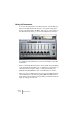

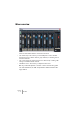
Table Of Contents

V-STACK
7 – 70 The Mixer
Mixer overview
There are three different basic elements in the mixer:
• The channel strips. This is where you mix and adjust the sound of the VST
Instruments. Here you will also find four group channels, for submixing several
instrument channels.
• The common panel. This panel to the left of the channel strips contains global
settings for the Mixer and the channels.
• The Master section. This is where you adjust the master level.
Below you will find separate overviews of these elements along with
two related windows, the VST Output window and the Channel Set-
tings window.