
V-Stack
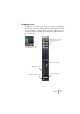
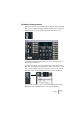

Table Of Contents

V-STACK
The Mixer 7 – 73
The Master section
The Master section allows you to control the output level of the Master
bus (the main output bus). With the Mixer in extended mode, the Mas-
ter section will also contain the Master effect slots. This section can
be shown or hidden in the Mixer by clicking the Show Master button in
the common panel.
Master effect slots (shown
in the extended mixer
panel)
Master volume fader
Master level meters
Output routing pop-up
Click this button to hide or
show the Master section.
Master Mono/Stereo switch