
V-Stack
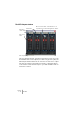
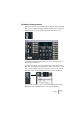

Table Of Contents

V-STACK
7 – 74 The Mixer
The VST Outputs window
This is a separate window, opened from the Devices menu. If your au-
dio hardware has several outputs (more than a single stereo pair), the
VST Outputs window will show one stereo bus for each stereo output
pair. Use the settings in the window to activate or deactivate buses,
route each bus to the desired output on your audio hardware and con-
trol the bus volumes.
Activate bus
Bus volume
fader
Bus stereo link switch – deactivate this to set
separate levels for the left and right bus channel.
Bus output routing
Bus name –
click to change.