
V-Stack
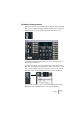
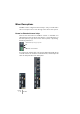
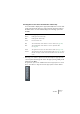
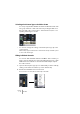

Table Of Contents

V-STACK
7 – 78 The Mixer
Selecting what channel types should be shown
You can specify whether the Mixer should show VST Instrument chan-
nels, group channels or both. This is done by clicking the buttons in
the lower part of the common panel – when a button is lit, the corre-
sponding channel type is shown.
• You can also change this setting on the View Options pop-up in the
common panel.
Pull down the pop-up menu and activate or deactivate the “Group” and “VSTi” options
to show or hide channel types.
Hiding individual channels
You can also hide individual channels in the Mixer. This is useful if you
want to view the channels from a specific VST Instrument only, or hide
additional unused channels for an instrument with multiple outputs.
Proceed as follows:
1. Open the View Options pop-up for a channel that you wish to hide by
clicking on the down arrow at the top of the channel strip.
2. Activate the “Hideable” item from the menu.
The menu item is now ticked, but the channel strip is still visible.