
V-Stack
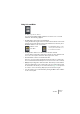
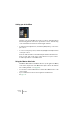
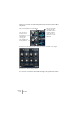
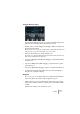
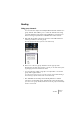
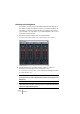
Table Of Contents

V-STACK
The Mixer 7 – 83
Using Solo and Mute
The Mute (top) and Solo buttons.
You can use the Mute and Solo buttons to silence one or several
channels. The following applies:
• The Mute button silences the selected channel.
Clicking the Mute button again un-mutes the channel. Several channels can be muted
simultaneously. A muted channel is indicated by a lit Mute button, and also by the lit
Global Mute indicator on the common panel.
• Clicking the Solo button for a channel mutes all other channels.
A soloed channel is indicated by a lit Solo button, and also by the lit Global Solo indi-
cator on the common panel. Click the Solo button again to turn off Solo.
• Several channels can be soloed at the same time.
However, if you press [Ctrl]/[Command] and click the Solo button for a channel, any
other soloed channels will automatically be un-soloed (i.e. this Solo mode is exclusive).
• [Alt]/[Option]-clicking a Solo button activates “Solo Group” for that channel.
In this mode (indicated by a red solo button without any other channels being muted)
the channel will not be muted if you solo another channel (see page 116 for a practical
use of this). To turn off Solo Group, [Alt]/[Option]-click the Solo button again.
• You can un-mute or un-solo all channels by clicking the Mute or Solo indicator
on the common panel.
A Muted Channel
in the Mixer.
A lit Global Mute indicator on the
common panel shows that one or
more channels are muted.