
V-Stack
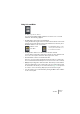
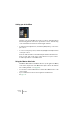
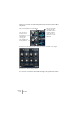
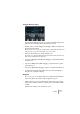
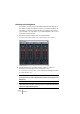
Table Of Contents

V-STACK
The Mixer 7 – 85
Making EQ settings
Each channel has a built-in parametric equalizer with four bands or
“modules”. You make settings for this in the upper area of the channel
strips (extended mode) or in the Channel Settings window. The pa-
rameters are the same in both cases, but only the Channel Settings
window gives you access to EQ presets and the Reset function.
To make equalizer settings, activate as many EQ modules you need
(up to four) by clicking their power buttons and adjust the gain, fre-
quency and Q parameters. The parameters work as follows:
• EQ module 1 and 4 can also work as high/low shelving or high/low-pass
filters, in the following way:
If the Q-value for EQ module 1 is set to minimum, it will act as a low shelving filter; if it
is set to maximum, it will act as a high-pass filter.
If the Q-value for EQ module 4 is set to minimum, it will act as a high shelving filter; if it
is set to maximum, it will act as a low-pass filter.
Parameter Description
Gain Governs the amount of boost or attenuation around the set frequency.
The range is ± 24dB.
Frequency The center frequency for the equalization. Around this frequency, the
sound will be boosted or attenuated according to the Gain setting. The
range is 20Hz to 20kHz.
Q Determines the width of the frequency band around the center fre-
quency to be affected. The narrower the frequency band, the more
drastic the effect of the boost or attenuation.