
V-Stack
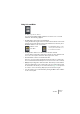
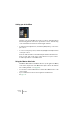
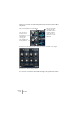
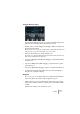
Table Of Contents

V-STACK
7 – 86 The Mixer
Here’s an overview of how the EQ parameters are laid out in the differ-
ent panels:
The EQ in the extended mixer panel, “EQ+” mode (left) and “EQs” mode (right).
The EQ in the Channel Settings window.
You can also click in the value fields and type exact parameter values.
The outer ring of
the dial controls
the frequency,
while the inner
controls gain.
The small dial sets
the Q parameter.
The top value slider
controls the gain,
the middle controls
frequency and the
lower sets the Q
parameter for each
EQ band.
EQ on/off (individual for each EQ band).