
V-Stack
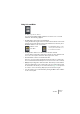
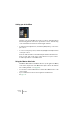
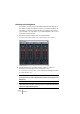
Table Of Contents

V-STACK
7 – 90 The Mixer
Activating and routing buses
The number of buses shown in the VST Outputs window depends on
the number of physical outputs you have on your audio hardware. As
with inputs, you need to activate the buses you want to use, and as-
sign each bus to an output pair on your audio hardware. This is done
in the VST Outputs window:
1. Pull down the Devices Menu and select VST Outputs.
The window will contain a number of stereo “channel strips”, one for each bus:
2. Activate the buses you need by clicking on their “On” buttons.
The indicator in the button lights up to show that the bus is active.
To conserve processor power, you should avoid activating buses that
you don’t need to use.
❐
The Master bus (Bus 1) is always available and activated. This is why it
doesn’t have an “On” button. By default, all channels are assigned to the
Master bus.
❐
The bus settings are saved with the project. However, if you select an-
other ASIO Device and then open the project, you will be alerted that the
saved bus settings will be ignored.