
Installation Guide



Stinger HEIGH10 Radio Replacement Kit
for select 2014-2019 Silverado/Sierra Truck
SR-GM14H
© 2020 AAMP Global. All rights reserved. PAC is a Power Brand of AAMP Global.
Pacific Accessory Corporation
Page 12
Rev: V1
Date: 030121
®
®
Section Four: Display Mounting Panel Preparation
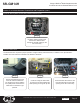
Step 2Step 1 Step 3
Once all the clips are released,
remove the climate controls from
the factory bezel.
With the factory radio display /
climate control panel face down,
apply slight pressure to the front
of the controls while releasing the
locking tabs around the perimeter.
Align the controls in the HEIGH10
mounting panel and push to seat
and lock all the retaining clips.
Part One: Transferring the Climate Controls
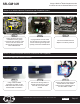
Step 2
Step 1
Attach the display to the panel
using four M4 x 10 screws from
the HEIGH10 hardware pack.
Insert the display into the front of
the mounting panel and carefully
turn the panel over while holding
the display in place.
Part Two: Mounting the Display