
Manual

8 User Interface
StorCase Technology, Inc. InfoStation 12-Bay SCSI User's Guide - Rev. B00
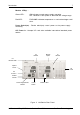
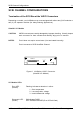
LED Indicator and User Interface Panel
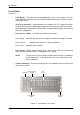
Each InfoStation provides the user with a visual indication of chassis configurations and
communication statuses, in addition to providing an RS-232 connection for system environ-
mental monitoring, configuration, and control (Figure 4).
Figure 4: UI Module
RS-232
Serial Port
IFS12_4
Reset
Mute
Warning
Power
Fault
Override
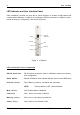
LED Indicator/UI Panel Components
RS-232 Serial Port - RS-232 serial connection used for InfoStation external monitoring
and configuration
Reset Switch - Resets InfoStation User Interface Module (will not reset SCSI bus)
Override (Amber) - ON = Warning condition commands are overridden
NOTE: Factory default is OFF (recommended).
Mute (Amber) - ON = Audible alarm is disabled
Fault (Red) - ON = One or more fault conditions
Warning (Amber) - ON = One or more warning conditions
Power (Green) - ON = Power to the chassis is ON