
User Guide

10
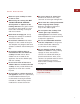
To change the power level setting—the
element is activated and the power bar graph
r
emains steadily lit:
T
ouch ”
+
”
to increase the power level by
preset one or two bars on the power bar
graph.
Touch ”
–
” to decrease the power level by
preset one or two bars on the power bar
graph.
Touch
HIGH
to increase the power level
directly to full power.
Touch
MELT
to decrease the power level
directly to the lowest power.
Touch
OFF ON
to turn the element off.
IMPORTANT NOTE:
If no cookware is placed
on a heating element after activating the
element, the control will blink for 30 seconds,
then the element will automatically shut off.
IMPORTANT NOTE:
To quickly deenergize
both heating elements, use the universal
OFF
touch pad located in the lower area of the
control panel.
COOKTOP OPERATION
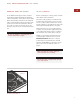
To activate a heating element, touch the
OFF ON
touch pad that corresponds to the
e
lement you wish to use. The power bar
indicator graph will begin to blink and show
a half-power status.
To complete the element activation, touch one
o
f the following symbols or touch pads of the
element control while the bar graph is still
blinking:
Touch the ”
+
” or ”
–
” symbol to set power
output to 25% and complete the activation.
Touch
HIGH
to set the power output to full
power and complete the activation.
Touch
MELT
to set the power output to the
lowest power and complete the activation.
WOLF INDUCTION COOKTOP USE & CARE
SIM
HIG
H
OFF
ON
OF
F ON
M
ELT
H
IG
H
HI-POWER
OFF
O
SIM
HIG
H
OFF
ON
OFF ON
MELT
HIGH
HI-POWER
OFF
O
SIM
HIG
H
OF
F
ON
OFF
ON
M
ELT
H
IG
H
H
I-
P
O
WER
OFF
O
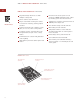
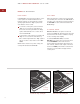
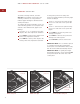
MELT touch padHIGH touch pad Universal OFF touch pad
HIGH
touch pad
Universal OFF
touch pad
MELT
touch pad