
User Guide

8
WOLF INDUCTION COOKTOP USE & CARE
MODES OF OPERATION
LOCK MODE
I
n
L
ock mode
,
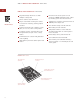
all touch pad operations on the
control panel are disabled and both of the
heating elements are deenergized. A steady
g
lowing light within the ”
k
ey
”
symbol indi-
cates that the unit is locked.
To lock the control panel, touch and hold
”
key
” for 3 seconds. The unit will beep
three times and the light within the ”
key
”
symbol will illuminate. The control unit is
now in
Lock mode
.
To unlock the control panel, touch and hold
”
key
” for 3 seconds. The unit will beep
twice and the light within the ”
key
” symbol
will go out. The control unit is now in
Idle
mode
.
NOTE: If there has been a power outage, the
cooktop will default to
Lock mode
.
SIM
HIG
H
OFF
ON
OF
F ON
M
ELT
H
IG
H
HI-POWER
OFF
O
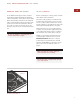
Lock mode ”key” touch pad
Lock ”key”
touch pad
IDLE MODE
A
fter unlocking the control panel as described
in Lock Mode, the unit enters the
Idle mode
of
operation. The only valid touch pad operations
a
re
O
FF ON
f
or each element and the
L
ock
mode
”
key
”.
HI-POWER MODE
Hi-Power mode
boosts power on the rear
element to 2200 W by diverting power from the
front element. This mode is suitable for frying
foods or boiling water rapidly.
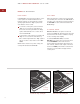
To activate
Hi-Power mode
, touch the
OFF ON
touch pad for the rear element, then
touch
HI-POWER
. Power from the front
element will automatically be diverted to the
rear element, and the total output of the front
element on
HIGH
power will be reduced. This
reduction in power will be displayed in the
control panel.
SIM
HIG
H
OF
F
ON
OFF
ON
M
E
LT
H
IG
H
H
I-
P
O
WER
OFF
O
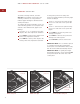
Hi-Power mode touch pad
Hi-Power
touch pad