
Computer Accessories User Manual

106 SunPCi III 3.2.1 User’s Guide • March 2004
Connecting USB Devices
With SunPCi III, you now have three available USB devices: one on the main card
backplate and two on the USB/Firewire backplate.
Since the USB devices are USB 2.0, they are much faster than the older USB 1.1 or
parallel port devices.
Refer to the previous section, “Connecting the USB Device” on page 104, for further
information about USB devices.
Connecting the Firewire Device
The 1394a Firewire device on the USB/Firewire backplate is another option for
connecting different types of peripherals, such as printers, hubs, modems, digital
cameras, and external CD-RW drives.
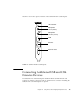
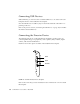
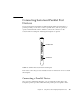
FIGURE 10-2 shows the options available on the USB/Firewire backplate.
FIGURE 10-2 SunPCi III USB/Firewire Backplate
Refer to the SunPCi III Quick Start Installation Guide for instructions on how to install
the backplate.
USB
Firewire
USB