
Computer Accessories User Manual


Chapter 11 Using SunPCi III Software 111
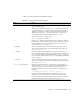
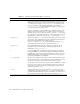
TABLE 11-1 lists the SunPCi III command-line options.
TABLE 11-1 SunPCi III Command-Line Options
Option Purpose
No option When no option is used with the sunpci command, by default SunPCi III
opens the SunPCi menu.
-B When used in conjunction with the sunpci -C disk.image file name and
-c cardname options, the -B option binds the named cardname MAC
address to the disk.image file name by writing the cardname card’s MAC
address into the filename.ini file header. This action overwrites the
original MAC address in the file header. Formerly -bindmac.
A general form of the -B option’s use is:
sunpci -C disk.image -c cardname -B
-b Enables you to change the default depth of the boot time VGA window to
be either 8 bit or 24 bit by default. If you change to 24 bit, you avoid some
colormap flashing issues, while still allowing you to choose the 8-bit
option, unlike NO8BIT. Formerly -depth.
-C disk.image Starts the SunPCi III window using the disk.image file name as drive C:.
This overrides the default drive specified in the default properties file
/$HOME/pc/SunPC.ini.
-c cardname Starts the SunPCi III card using cardname as drive C:. The cardname is a
label assigned by the SunPCi III software starting with Card1, Card2, and
so on. To obtain a listing of installed card names use the -l option. For
more information about multiple card use, see “Using Multiple SunPCi III
Cards” on page 21.
-D disk.image Starts the SunPCi III window using the disk.image file name as drive D:.
This option overrides the default drive specified in the default properties
file /$HOME/pc/SunPC.ini.
-display hostname.domain:0.0 Displays the SunPCi III window on another Sun system hostname in
domain. Formerly -display. For example, to open the SunPCi III window
on another system named willow in the eastern domain, type the
following command on your Sun system (where the SunPCi III card is
installed):
/opt/SUNWspci3/bin/sunpci -d willow.eastern:0.0
-f Starts the card finder LED functionality in SunPCi III, which cycles
through the colors of the LED (green or amber) for several seconds.
-h Displays SunPCi III command-line Help. The option displays a list of all
SunPCi III command-line options and formats. Formerly -help.