
Computer Accessories User Manual


Chapter 11 Using SunPCi III Software 113
SunPCi III Menus
The first window you see when you start SunPCi III software is the SunPCi III
window. The following sections describe the File and Options menus at the top of
the SunPCi III window.
File Menu
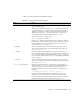
The SunPCi III File menu contains two commands: Reset PC and Exit. TABLE 11-2
describes the commands available within the File menu.
Caution – Close Microsoft Windows or Linux before closing SunPCi software by
either selecting Shut Down from the Start menu or choosing the Shutdown x86 OS
and Exit SunPCi button. If you do not shut down gracefully, you risk damage to the
application.
TABLE 11-2 File Menu Commands
Menu Command Purpose
Reset PC Closes and reboots the SunPCi and Windows or Linux software.
Similar to pressing the Reset button on a PC. Perform this action
in the following situations:
• If your keyboard or operating system running in the SunPCi
III window no longer responds
• To attach a different SunPCi III emulated hard drive
The keyboard shortcut for this command is Meta+R in CDE and
ALT+R in GNOME.
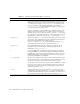
Exit (CDE)
Quit (GNOME)
Closes SunPCi III software and closes the SunPCi III window.
When you choose the Exit menu command, the SunPCi Exit
dialog box opens with several button options:
• Exit Now
• Shutdown x86 OS and Exit SunPCi
• Cancel
The keyboard shortcut for this command is Meta+X in CDE and
ALT+Q in GNOME.