
Computer Accessories User Manual


114 SunPCi III 3.2.1 User’s Guide • March 2004
Options Menu
The Options menu lets you create, update, attach, and grow emulated hard disk
drives, attach a CD-ROM drive, eject a CD/DVD, and also enables you to attach the
mouse to SunPCi III.
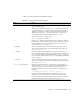
TABLE 11-3 describes the disk-related commands in the Options menu. Complete
instructions for choosing emulated drives are provided in “Emulated Drives and
SunPCi III Software” on page 12.
Note – In both user interfaces, there is a Help menu option. Currently, choosing this
option opens a dialog box listing credits for SunPCi. The keyboard commands for
this option is Meta+H in CDE and SHIFT+ALT+A in GNOME.
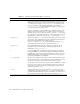
TABLE 11-3 Options Menu Commands
Menu Command Purpose
Attach an Existing
Emulated Drive
Specifies the emulated hard drive (directory/filename) you want
to assign to drive C: or D:.
The keyboard shortcut for this command is Meta+A in CDE and
ALT+A in GNOME.
Create a New
Emulated Drive
Creates a Solaris file that functions as your emulated drive
(SunPCi).
The keyboard shortcut for this command is Meta+C in CDE and
ALT+C in GNOME.
Create a New
Emulated Drive Druid
(GNOME Only)
Creates a Solaris file that functions as your emulated drive
(SunPCi). This task performs all the functions of Create a New
Emulated Drive, except that it allows you to choose one step at a
time instead of all the steps offered at once in the other window.
The keyboard shortcut for this command is Meta+D in CDE and
ALT+C in GNOME.
Grow an Emulated
Drive
Enables expansion and growth of an emulated hard disk.
The keyboard shortcut for this command is Meta+G in CDE and
ALT+G in GNOME.
Eject CD Ejects the CD or DVD from the CD-ROM drive.
The keyboard shortcut for this command is Meta+E in CDE and
ALT+E in GNOME.
Attach Mouse Enables you to attach the mouse to the SunPCi III window when
you are in SMI mode.
The keyboard shortcut for this command is Meta+M in CDE.