
Computer Accessories User Manual

Chapter 11 Using SunPCi III Software 127
Making Manual Changes to the Boot@Boot
Configuration
You can edit the /etc/Master.ini file in order to modify the following:
■ The DisplayNum for Xvnc to use if there is already an existing display using that
number (for instance, on a Sun Ray server)
■ The StartupScript to use (the default is
/opt/SUNWspci3/bin/VNCStartup)
■ The command-line arguments for starting SunPCi (for example, to add the
-title title_string option for the window manager decorations or to use a
different .ini file with the -p option)
■ The command-line arguments for VNC (for example, to make VNC display at a
different resolution, such as 1280 x 1024)
If it is necessary to make changes manually to the Boot@Boot configuration
information in the /etc/Master.ini file, for example, to change the configuration
file that is to be used by Card1 from /pc/card1.ini to /pc/Win2K.ini,the
SunPCi daemon will not immediately process those changes, as it has no knowledge
that the changes have taken place.
To inform the SunPCi software process that these changes have occurred, you must
use the sunpcidadm command with the -r option. This tells the SunPCi daemon
that it must reread the /etc/Master.ini file and reconfigure itself appropriately.
Note that any change does not take place until the modified sessions are restarted, so
to use the new /pc/Win2K.ini file, you must shut down and restart the SunPCi
session for Card1 using either the SunPCi graphical user interface or the
sunpcidadm command with the -D option.
Using an X Server Other Than Xvnc
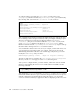
To use an X server other than Xvnc for a SunPCi card, you must add a line such as
the following to the section for that card in the /etc/Master.ini file:
For example, to configure Card1 to display on the X server running on the console of
the host named xyzzy you would add an entry to the [Card1] section of the
/etc/Master.ini file that would read DisplayName=xyzzy:0.
Note – Only Sun X servers and VNC are supported.
DisplayName=hostname:displaynum