
Computer Accessories User Manual

180 SunPCi III 3.2.1 User’s Guide • March 2004
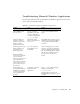
When installing Corel
WorkPerfect 2000 on
Windows XP
Professional, the
installation appears to
hang.
The Installation Wizard
dialog box is waiting for
user information, while
the user’s registration
dialog box is open in the
background and covered
by another Installation
Wizard dialog box.
The installation is placed
in “waiting” mode.
To avoid this issue, make sure to
delete the “white” Corel WP Office
2000 splash screen by closing the
Corel setup window. Then the
Installation Wizard dialog box is
viewable and works fine.
This issue does not occur during
every installation, but does happen
with some frequency.
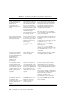
Norton Antivirus 2002
might require increase in
the Solaris file limit.
Norton Antivirus seems
to “hold on” to many of
the files it opens, which
might result in the log
file message:
Too many open
files.
Increase the number of files that can
be simultaneously open by Solaris
software,
To find out the current limit, use the
command:
ulimit -Hn
In the /etc/system, add the
following line:
set rlim_fd_max=XXXX
(XXXX is a greater number than the
one returned by the
ulimit -Hn
command.)
Some image rendering
problems exist when
working with Office XP
WordArt files in
Windows 2000 or
Windows XP
Professional.
Frame buffer is set to
8-bit color depth.
Change graphics settings to higher
color depth (16-bit or 24-bit).
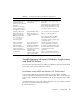
If a SunPCi III session
running Windows XP
Professional is used as a
PC Anywhere host, the
graphics display on the
remote system is not
updated.
Mouse movements are
sent and effected on the
host, andthe graphics on
the host are updated, but
those updates are not
sent back to the remote
system.
If a PC is used as the host and a
SunPCi III session is used as the
remote system, the graphics display
on the SunPCi III remote system is
correct.
This “session sharing” functionality
is, by default,available on Windows
XP Professional as “Remote
Desktop.” See Microsoft
documentation for more details.
Corel Office 2000 and
Corel Office 2002
installations do not work
properly and will not
install.
CD-ROMs that are not
ISO 9660 compliant
might not work on
Solaris systems.
Use only CD-ROMs that are ISO
9660 compliant.
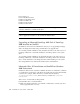
TABLE A-8 Troubleshooting Microsoft Windows Applications
Problem Cause Solution