
Computer Accessories User Manual



xxxviii SunPCi III 3.2.1 User’s Guide • March 2004
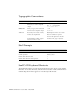
Typographic Conventions
Shell Prompts
SunPCi III Keyboard Shortcuts
The SunPCi III software provides keyboard shortcuts for the options on the SunPCi
III menus. To see these shortcuts, click the left mouse button on the SunPCi III menu
until the drop-down menu appears to view the keyboard shortcut.
Typeface Meaning Examples
AaBbCc123 The names of commands, files, and
directories; on-screen computer
output
Edit your.login file.
Use ls -a to list all files.
% You have mail.
AaBbCc123 What you type, when contrasted
with on-screen computer output
%
su
Password:
AaBbCc123 Book titles, new words or terms,
words to be emphasized
Read Chapter 6 in the User’s Guide.
These are called class options.
You must be superuser to do this.
Command-line variable; replace
with a real name or value
To delete a file, type rm filename.
Shell Prompt
C shell machine_name%
C shell superuser machine_name#
Bourne shell and Korn shell $
Bourne shell and Korn shell superuser #