
Computer Accessories User Manual

Chapter 2 Getting Started 11
Starting and Stopping the SunPCi III
Software
This section provides instructions for starting and stopping the SunPCi software.
▼ How to Start the SunPCi III Software
● To start the SunPCi software, open a terminal window and type the following
command at the Solaris prompt
:
When you start the SunPCi III software for the first time, the software creates a
Solaris directory named ~/pc, into which several SunPCi III files are installed.
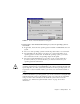
You then see a SunPCi splash screen and the SunPCi window opens.
Note – If you modify the $path statement in your .login file, you can create a
shortcut to open SunPCi. For information about customizing the SunPCi path, refer
to your Solaris software documentation.
▼ How to Exit the SunPCi III Software
Stopping the SunPCi software involves two steps: closing Microsoft Windows or
Linux and then closing the SunPCi software.
Caution – Always close Microsoft Windows or Linux before exiting from SunPCi
software or your files and applications could become corrupted.
See “SunPCi III Menus” on page 113 for descriptions of menu options that are
available.
% /opt/SUNWspci3/bin/sunpci