
Server User Manual
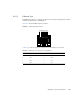
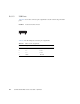
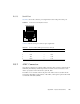
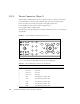
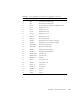
Table Of Contents
- Sun Netra™ CP3250 Blade Server User’s Guide
- Contents
- Figures
- Tables
- Preface
- Overview
- Hardware Installation and Service
- 2.1 Safety and Tool Requirements
- 2.2 Installing the Blade Server
- 2.3 Service Procedures
- 2.3.1 Hot-Swapping the Netra CP3250 Blade Server
- 2.3.2 Powering Off the Netra CP3250 Blade Server
- 2.3.3 Removing the Netra CP3250 Blade Server
- 2.3.4 Powering On the System
- 2.3.5 Automatic Power-Off Events
- 2.3.6 Servicing DIMMs
- 2.3.7 Installing the Optional Compact Flash Card
- 2.3.8 Installing Optional AMC
- 2.3.9 Adding or Replacing the Battery
- 2.3.10 Changing Jumper Settings
- 2.3.11 Checking DIP Switch Settings
- 2.3.12 Resetting the Netra CP3250 Blade Server
- Hardware Architecture
- Software Configuration
- Configuring and Using BIOS Firmware
- 5.1 About BIOS Settings
- 5.2 Changing the Configuration of a BIOS Menu Item
- 5.3 Setting the Boot Device Using BIOS Setup Screens
- 5.4 Setting Supervisor and User Passwords
- 5.5 Resetting the System Time and System Date
- 5.6 Updating the BIOS
- 5.7 Secondary BIOS Image
- 5.8 Perform a Live Firmware Upgrade
- 5.9 Power-On Self-Test
- 5.10 Changing POST Options
- BIOS Screens
- Physical Characteristics
- ShMM CLI and Commands
- Index

B-2 Sun Netra CP3250 Blade Server User’s Guide • April 2009
B.1 Form Factor
The Sun Netra CP3250 blade server is a standard 8-rack unit (8U) factor, single-slot
wide. It complies with the board mechanical dimensions that are required by the
PICMG 3.0 specification:
■ 322.25 mm x 280 mm (12.7 inches x 11.0 inches)
■ 30.48 mm (1.2 inch) front panel
B.2 Power and Thermal Metrics
Typical heat dissipation and power consumption metrics for a Sun Netra CP3250
blade server:
■ 225W maximum power (includes 25W to ARTM, 20W to AMC, and two Intel
Harpertown CPUs)
■ -5C - 55C for NEBS compliance
■ Power input: -36 VDC to -72 VDC (-48VDC nominal)
■ CPU temperature thresholds are set relative to the Thermal Control Circuit (TCC)
activation point of the Intel Harpertown CPUs. An offset of 95C is added to
provide an approximate CPU die temperature.
Two heatsinks are mounted to the Sun Netra CP3250 blade server. The heatsinks and
DIMMs are positioned on the blade server to provide adequate airflow (bottom to
top).
B.3 Connectors and Pinouts
B.3.1 Front Panel Connectors
The front panel has the following connectors, see FIGURE 1-1:
■ One 10/100/1000BASE-T Ethernet port (RJ-45)
■ One serial port (RJ-45)
■ Two USB ports