
Server User Manual
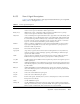
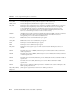


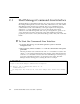
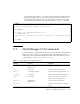
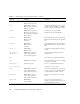
Table Of Contents
- Sun Netra™ CP3250 Blade Server User’s Guide
- Contents
- Figures
- Tables
- Preface
- Overview
- Hardware Installation and Service
- 2.1 Safety and Tool Requirements
- 2.2 Installing the Blade Server
- 2.3 Service Procedures
- 2.3.1 Hot-Swapping the Netra CP3250 Blade Server
- 2.3.2 Powering Off the Netra CP3250 Blade Server
- 2.3.3 Removing the Netra CP3250 Blade Server
- 2.3.4 Powering On the System
- 2.3.5 Automatic Power-Off Events
- 2.3.6 Servicing DIMMs
- 2.3.7 Installing the Optional Compact Flash Card
- 2.3.8 Installing Optional AMC
- 2.3.9 Adding or Replacing the Battery
- 2.3.10 Changing Jumper Settings
- 2.3.11 Checking DIP Switch Settings
- 2.3.12 Resetting the Netra CP3250 Blade Server
- Hardware Architecture
- Software Configuration
- Configuring and Using BIOS Firmware
- 5.1 About BIOS Settings
- 5.2 Changing the Configuration of a BIOS Menu Item
- 5.3 Setting the Boot Device Using BIOS Setup Screens
- 5.4 Setting Supervisor and User Passwords
- 5.5 Resetting the System Time and System Date
- 5.6 Updating the BIOS
- 5.7 Secondary BIOS Image
- 5.8 Perform a Live Firmware Upgrade
- 5.9 Power-On Self-Test
- 5.10 Changing POST Options
- BIOS Screens
- Physical Characteristics
- ShMM CLI and Commands
- Index

Appendix C ShMM CLI and Commands C-3
If started without parameters, clia enters an interactive mode. In that mode, the
program repeatedly issues a prompt to the terminal, accepts user input as the
next command with parameters, executes that command, and shows the results
on the terminal, until the user types the command exit or quit. For example:
C.2 Shelf Manager CLI Commands
The Shelf Manager CLI implements the following commands. They are described in
detail in the Netra CT 900 Server System Administration Manual (819-1177), with a
subsection for each command, in alphabetical order of the command names. For the
web site URL, see “Related Documentation” on page xv.
# clia
Pigeon Point Shelf Manager Command Line Interpreter
CLI> ipmc 20
20: Entity: (d0, 0) Maximum FRU device ID: 20
PICMG Version 2.0
Hot Swap State: M4, Previous: M3, Last State Change Cause: Normal State Change
(0)
CLI> exit
#
TABLE C-1 Shelf Manager CLI Command Summary
Command Parameters Description
activate IPMB address
FRU device ID
Activates the specified FRU.
alarm alarm type Activates or clears Telco alarms.
board -v slot number (optional) Shows information about blade servers.
boardreset slot number Resets the specified ATCA blade server.
console slot number Opens a console session on the node
blade server in the specified slot.
deactivate IPMB address
FRU device ID
Deactivates the specified FRU.
exit|quit Exits from the interpreter in interactive
mode.