
Server User Manual
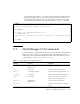
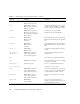

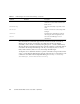

Table Of Contents
- Sun Netra™ CP3250 Blade Server User’s Guide
- Contents
- Figures
- Tables
- Preface
- Overview
- Hardware Installation and Service
- 2.1 Safety and Tool Requirements
- 2.2 Installing the Blade Server
- 2.3 Service Procedures
- 2.3.1 Hot-Swapping the Netra CP3250 Blade Server
- 2.3.2 Powering Off the Netra CP3250 Blade Server
- 2.3.3 Removing the Netra CP3250 Blade Server
- 2.3.4 Powering On the System
- 2.3.5 Automatic Power-Off Events
- 2.3.6 Servicing DIMMs
- 2.3.7 Installing the Optional Compact Flash Card
- 2.3.8 Installing Optional AMC
- 2.3.9 Adding or Replacing the Battery
- 2.3.10 Changing Jumper Settings
- 2.3.11 Checking DIP Switch Settings
- 2.3.12 Resetting the Netra CP3250 Blade Server
- Hardware Architecture
- Software Configuration
- Configuring and Using BIOS Firmware
- 5.1 About BIOS Settings
- 5.2 Changing the Configuration of a BIOS Menu Item
- 5.3 Setting the Boot Device Using BIOS Setup Screens
- 5.4 Setting Supervisor and User Passwords
- 5.5 Resetting the System Time and System Date
- 5.6 Updating the BIOS
- 5.7 Secondary BIOS Image
- 5.8 Perform a Live Firmware Upgrade
- 5.9 Power-On Self-Test
- 5.10 Changing POST Options
- BIOS Screens
- Physical Characteristics
- ShMM CLI and Commands
- Index

Appendix C ShMM CLI and Commands C-5
setfanlevel IPMB address
FRU device ID
level
Sets a new level for the fan controlled by
the specified FRU.
Use clia setfanlevel 20 3 5 to get
the fans to slow down.
setfanpolicy IPMB address
FRU device ID
action to be taken: ENABLE or DISABLE
timeout (optional)
site type (optional)
site number (optional)
Enables or disables fan trays for cooling
management in addition to the Fan
Geography record if this one is presented
in the Shelf FRU.
setthreshold IPMB address
sensor name
sensor number
threshold type
threshold value
Changes a specific threshold value
(upper/lower,
critical/non-critical/non-recoverable) for
a specific sensor.
setuserlabel shelf name
slot number name
Configures user assigned names for the
shelf and the blade servers. Blade server
names are assigned to slot numbers.
shelf subcommand, with its parameters Shows general information about the
shelf; several subcommands allow
setting shelf attributes and getting
additional information about specific
areas.
shelfaddress Shelf Address string (optional) Gets or sets the Shelf Address field of the
Address Table within Shelf FRU
Information.
shelf address_table Shows the address table record in the
shelf FRU info with shelf address and list
of address table entries. For each entry,
shows hardware address, site type, and
site number.
shelf cooling_state Shows the current cooling state of the
shelf with normal, minor, major, and
critical alert information.
shelf fans_state Shows the current state of the fan
techometers in the shelf with normal,
minor, major and critical alert
information.
shmstatus Shows the Shelf Manager Active/Backup
status.
TABLE C-1 Shelf Manager CLI Command Summary (Continued)
Command Parameters Description