
Server User Manual

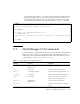
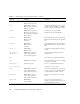

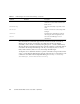

Table Of Contents
- Sun Netra™ CP3250 Blade Server User’s Guide
- Contents
- Figures
- Tables
- Preface
- Overview
- Hardware Installation and Service
- 2.1 Safety and Tool Requirements
- 2.2 Installing the Blade Server
- 2.3 Service Procedures
- 2.3.1 Hot-Swapping the Netra CP3250 Blade Server
- 2.3.2 Powering Off the Netra CP3250 Blade Server
- 2.3.3 Removing the Netra CP3250 Blade Server
- 2.3.4 Powering On the System
- 2.3.5 Automatic Power-Off Events
- 2.3.6 Servicing DIMMs
- 2.3.7 Installing the Optional Compact Flash Card
- 2.3.8 Installing Optional AMC
- 2.3.9 Adding or Replacing the Battery
- 2.3.10 Changing Jumper Settings
- 2.3.11 Checking DIP Switch Settings
- 2.3.12 Resetting the Netra CP3250 Blade Server
- Hardware Architecture
- Software Configuration
- Configuring and Using BIOS Firmware
- 5.1 About BIOS Settings
- 5.2 Changing the Configuration of a BIOS Menu Item
- 5.3 Setting the Boot Device Using BIOS Setup Screens
- 5.4 Setting Supervisor and User Passwords
- 5.5 Resetting the System Time and System Date
- 5.6 Updating the BIOS
- 5.7 Secondary BIOS Image
- 5.8 Perform a Live Firmware Upgrade
- 5.9 Power-On Self-Test
- 5.10 Changing POST Options
- BIOS Screens
- Physical Characteristics
- ShMM CLI and Commands
- Index

C-6 Sun Netra CP3250 Blade Server User’s Guide • April 2009
Most informational commands support brief and verbose modes of execution,
differing in the amount of information provided. Brief mode is the default
(standard); verbose mode is selected by using the option -v in the command line,
directly after the command and before the positional arguments. Commands that are
executed on the backup Shelf Manager can only access objects (such as sensors,
FRUs, IPM controllers) that are local to the backup Shelf Manager.
To help the user to determine whether a specific command is being executed on the
active or on the backup Shelf Manager, the following message is issued when a CLI
command is executed on the backup Shelf Manager: Running on the Backup
Shelf Manager, with limited functionality.
showhost slot-number Displays version information about the
firmware on certain Netra CP3x60 node
blade servers.
showunhealthy Shows the unhealthy components of the
shelf.
switchover Initiates a switchover to the backup Shelf
Manager.
terminate Terminates the Shelf Manager without
rebooting the shelf management card.
version Shows the Shelf Manager version
information.
TABLE C-1 Shelf Manager CLI Command Summary (Continued)
Command Parameters Description