
Server User Manual
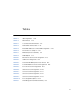

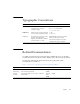
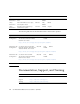

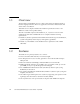
Table Of Contents
- Sun Netra™ CP3250 Blade Server User’s Guide
- Contents
- Figures
- Tables
- Preface
- Overview
- Hardware Installation and Service
- 2.1 Safety and Tool Requirements
- 2.2 Installing the Blade Server
- 2.3 Service Procedures
- 2.3.1 Hot-Swapping the Netra CP3250 Blade Server
- 2.3.2 Powering Off the Netra CP3250 Blade Server
- 2.3.3 Removing the Netra CP3250 Blade Server
- 2.3.4 Powering On the System
- 2.3.5 Automatic Power-Off Events
- 2.3.6 Servicing DIMMs
- 2.3.7 Installing the Optional Compact Flash Card
- 2.3.8 Installing Optional AMC
- 2.3.9 Adding or Replacing the Battery
- 2.3.10 Changing Jumper Settings
- 2.3.11 Checking DIP Switch Settings
- 2.3.12 Resetting the Netra CP3250 Blade Server
- Hardware Architecture
- Software Configuration
- Configuring and Using BIOS Firmware
- 5.1 About BIOS Settings
- 5.2 Changing the Configuration of a BIOS Menu Item
- 5.3 Setting the Boot Device Using BIOS Setup Screens
- 5.4 Setting Supervisor and User Passwords
- 5.5 Resetting the System Time and System Date
- 5.6 Updating the BIOS
- 5.7 Secondary BIOS Image
- 5.8 Perform a Live Firmware Upgrade
- 5.9 Power-On Self-Test
- 5.10 Changing POST Options
- BIOS Screens
- Physical Characteristics
- ShMM CLI and Commands
- Index

xvi Sun Netra CP3250 Blade Server User’s Guide • April 2009
The following table lists the documentation that is related to this product.
.
Documentation, Support, and Training
Late-breaking
Information
Netra CP3250 Blade Server Product
Notes
820-5194 PDF,
HTML
Online
Safety
Information
Netra CP3250 Blade Server Safety
and Compliance Guide
820-5198 PDF,
HTML
Online
Safety
Information
Important Safety Information for
Sun Hardware Systems
816-7190 Printed Shipkit
Application Title Part Number Format Location
Installation and
Configuration
Sun Netra CP32x0 SAS Storage
Advanced Rear Transition Module,
Dual HD User ’s Guide
820-3147 PDF,
HTML
Online
http://docs.sun.com/app/docs/prod/cp32x0.sas#hic
Installation and
Configuration
Sun Netra™ CP32x0 Quad GbE,
Dual Fibre Channel, Advanced Rear
Transition Module, User’s Guide
820-3148 PDF,
HTML
Online
http://docs.sun.com/app/docs/prod/cp32x0.4gbefc?l=en#hic
Installation and
Configuration
Sun Netra™ CP32x0 10GbE
Advanced Rear Transition Module,
Dual Port User ’s Guide
820-3150 PDF,
HTML
Online
http://docs.sun.com/app/docs/prod/cp32x0.10gbee?l=en#hic
Sun Function URL
Documentation http://docs.sun.com/
Support http://www.sun.com/support/
Training http://www.sun.com/training/
Application Title Part Number Format Location