
Server User Manual
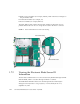
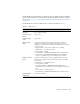

Table Of Contents
- Sun Netra™ CP3250 Blade Server User’s Guide
- Contents
- Figures
- Tables
- Preface
- Overview
- Hardware Installation and Service
- 2.1 Safety and Tool Requirements
- 2.2 Installing the Blade Server
- 2.3 Service Procedures
- 2.3.1 Hot-Swapping the Netra CP3250 Blade Server
- 2.3.2 Powering Off the Netra CP3250 Blade Server
- 2.3.3 Removing the Netra CP3250 Blade Server
- 2.3.4 Powering On the System
- 2.3.5 Automatic Power-Off Events
- 2.3.6 Servicing DIMMs
- 2.3.7 Installing the Optional Compact Flash Card
- 2.3.8 Installing Optional AMC
- 2.3.9 Adding or Replacing the Battery
- 2.3.10 Changing Jumper Settings
- 2.3.11 Checking DIP Switch Settings
- 2.3.12 Resetting the Netra CP3250 Blade Server
- Hardware Architecture
- Software Configuration
- Configuring and Using BIOS Firmware
- 5.1 About BIOS Settings
- 5.2 Changing the Configuration of a BIOS Menu Item
- 5.3 Setting the Boot Device Using BIOS Setup Screens
- 5.4 Setting Supervisor and User Passwords
- 5.5 Resetting the System Time and System Date
- 5.6 Updating the BIOS
- 5.7 Secondary BIOS Image
- 5.8 Perform a Live Firmware Upgrade
- 5.9 Power-On Self-Test
- 5.10 Changing POST Options
- BIOS Screens
- Physical Characteristics
- ShMM CLI and Commands
- Index

Chapter 1 Overview 1-13
Additionally, VMware is a software component certified to work with the Sun Netra
CP3250 blade server. It is listed on VMware’s HCL at:
http://www.vmware.com/resources/compatibility/search.php?action=
search&deviceCategory=server&productId=1&keyBasic=
netra&maxDisplayRows=50&key=netra&release%5B%5D=-1&datePosted=
-1&stepping=&nsockets=&ncores=&max_mem=
1.7 Technical Support and Warranty
Should you have any technical questions or support issues that are not addressed in
the Sun Netra CP3250 blade server documentation set or on the technical support
web site, contact your local Sun Services representative. This hardware carries a
one-year return-to-depot warranty.
For customers in the U.S. or Canada, call 1-800-USA-4SUN (1-800-872-4786).
For customers in the rest of the world, please find the World Wide Solution Center
nearest you at the following web site:
http://www.sun.com/contact/services_solutions.jsp
When you call Sun Services, be sure to indicate if the Sun Netra CP3250 blade server
was purchased separately, and is not associated with a system. Please have the blade
server identification information ready. For proper identification of the blade server,
be prepared to give the representative the blade server part number, and serial
number.
1.7.1 Locating the Part Number and Serial Number
Information
The Sun Netra CP3250 blade server part number, serial number, revision number,
and media access control (MAC) address are printed on stickers located on the Sun
Netra CP3250 blade server (
FIGURE 1-5).
The Sun barcode label provides the following information:
■ Blade server serial number (for example, 1005LCB-07296R0912), which is on the
barcode label
The part number/dash/revision/date code label provides the following
information: