
Server User Manual
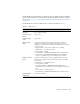

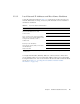
Table Of Contents
- Sun Netra™ CP3250 Blade Server User’s Guide
- Contents
- Figures
- Tables
- Preface
- Overview
- Hardware Installation and Service
- 2.1 Safety and Tool Requirements
- 2.2 Installing the Blade Server
- 2.3 Service Procedures
- 2.3.1 Hot-Swapping the Netra CP3250 Blade Server
- 2.3.2 Powering Off the Netra CP3250 Blade Server
- 2.3.3 Removing the Netra CP3250 Blade Server
- 2.3.4 Powering On the System
- 2.3.5 Automatic Power-Off Events
- 2.3.6 Servicing DIMMs
- 2.3.7 Installing the Optional Compact Flash Card
- 2.3.8 Installing Optional AMC
- 2.3.9 Adding or Replacing the Battery
- 2.3.10 Changing Jumper Settings
- 2.3.11 Checking DIP Switch Settings
- 2.3.12 Resetting the Netra CP3250 Blade Server
- Hardware Architecture
- Software Configuration
- Configuring and Using BIOS Firmware
- 5.1 About BIOS Settings
- 5.2 Changing the Configuration of a BIOS Menu Item
- 5.3 Setting the Boot Device Using BIOS Setup Screens
- 5.4 Setting Supervisor and User Passwords
- 5.5 Resetting the System Time and System Date
- 5.6 Updating the BIOS
- 5.7 Secondary BIOS Image
- 5.8 Perform a Live Firmware Upgrade
- 5.9 Power-On Self-Test
- 5.10 Changing POST Options
- BIOS Screens
- Physical Characteristics
- ShMM CLI and Commands
- Index

Chapter 1 Overview 1-15
The IPMI FRU ID manufacturing records match Sun part number and serial number
labels on the product. For more information about part number and serial number
labels, see Section 1.7.1, “Locating the Part Number and Serial Number Information”
on page 1-13.
The IPMI FRU ID contains six FRU ID areas, which are defined in
TABLE 1-2.
TABLE 1-2 FRU ID Areas
FRU Area Description
COMMON
HEADER
Contains header and pointers to other FRUID sections and is used
by fru utility software
INTERNAL USE
AREA
Not present
CHASSIS INFO
AREA
Not present
BOARD INFO
AREA
Contains the manufacturing record without memory (FRU part
number) for the FRU level assembly of the blade server. This
assembly level is equivalent to the FRU replacement that is received
from Sun Service.
• Mfg Date/Time = (Date/Time of blade server assembly}
• Manufacturer = {manufacturer name)
• Product Name = CP3250
• Serial Number = XXXXXXX-XXXXXXXXXX (Sun 18-digit format)
• Part Number = 000000000PPPPPPPDDRR (Sun Part Number)
where 0 = Leading zeroes, P= Part Number, D=Dash, R=Rev
PRODUCT INFO
AREA
Contains manufacturing record for configured blade server with
memory. This assembly level includes the base blade server (FRU)
plus memory.
• Manufacturer = (manufacturer name)
• Product Name = CP3250
• Part/Model Number = 000000000PPPPPPPDDRR (Sun Part
Number) where 0 = Leading zeroes, P= Part Number, D=Dash, R=
Rev
• Product Version = XXXX (dash/rev)
• Serial Number = XXXXXXX-XXXXXXXXXX (Sun 18-digit format)
MULTIRECORD
INFO AREA
Sun Internal Use Only