
Server User Manual

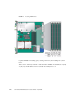
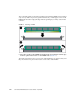
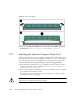
Table Of Contents
- Sun Netra™ CP3250 Blade Server User’s Guide
- Contents
- Figures
- Tables
- Preface
- Overview
- Hardware Installation and Service
- 2.1 Safety and Tool Requirements
- 2.2 Installing the Blade Server
- 2.3 Service Procedures
- 2.3.1 Hot-Swapping the Netra CP3250 Blade Server
- 2.3.2 Powering Off the Netra CP3250 Blade Server
- 2.3.3 Removing the Netra CP3250 Blade Server
- 2.3.4 Powering On the System
- 2.3.5 Automatic Power-Off Events
- 2.3.6 Servicing DIMMs
- 2.3.7 Installing the Optional Compact Flash Card
- 2.3.8 Installing Optional AMC
- 2.3.9 Adding or Replacing the Battery
- 2.3.10 Changing Jumper Settings
- 2.3.11 Checking DIP Switch Settings
- 2.3.12 Resetting the Netra CP3250 Blade Server
- Hardware Architecture
- Software Configuration
- Configuring and Using BIOS Firmware
- 5.1 About BIOS Settings
- 5.2 Changing the Configuration of a BIOS Menu Item
- 5.3 Setting the Boot Device Using BIOS Setup Screens
- 5.4 Setting Supervisor and User Passwords
- 5.5 Resetting the System Time and System Date
- 5.6 Updating the BIOS
- 5.7 Secondary BIOS Image
- 5.8 Perform a Live Firmware Upgrade
- 5.9 Power-On Self-Test
- 5.10 Changing POST Options
- BIOS Screens
- Physical Characteristics
- ShMM CLI and Commands
- Index

2-24 Sun Netra CP3250 Blade Server User’s Guide • April 2009
FIGURE 2-7 Removing a DIMM
5. If you are replacing the DIMM you removed with a new DIMM, install it as
described in Section 2.3.6.2, “Installing a DDR2 DIMM” on page 2-21.
2.3.7 Installing the Optional Compact Flash Card
An IDE Compact Flash card can be installed on the Sun Netra CP3250 blade server.
The Compact Flash card is not hot-swappable, and there is no access to the Compact
Flash card once the Sun Netra CP3250 blade server is installed in an ATCA shelf.
1. Access the blade server by performing one of the following procedures:
■ If the Sun Netra CP3250 blade server is installed in an ATCA shelf, remove the
blade server from the shelf as explained in Section 2.3.3, “Removing the Netra
CP3250 Blade Server” on page 2-18.
■ Remove the Sun Netra CP3250 blade server from its antistatic envelope and place
it on an ESD mat near the ATCA shelf.
If an ESD mat is not available, you can place the blade server on the antistatic
envelope in which it was packaged.
Caution – Do not place blade servers on top of an antistatic bag unless the outside
of the bag also has antistatic protective properties.