
Computer Accessories User Manual

4 Sun Fire X4150 Configuration Guide • March 2009
Test Installed DIMMs
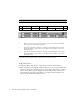
Verify that the server can see all installed DIMMs.
How to Add a DVD/USB Drive
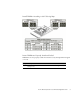
■ The server ships with filler panels for a vacant DVD drive slot and each vacant
HD slot.
■ You must install the DVD drive/USB hub before you install the hard drives.
Testing Installed Memory
• Reassemble the server and use one of the following methods to verify the
DIMMs:
• Boot from the Tools and Drivers DVD and access the diagnostics by selecting
the option to run hardware diagnostics (option 1).
• Log in to the service processor’s (SP) ILOM using ssh or a browser and the IP
address of the SP.
Adding a DVD/USB Drive Unit
1
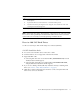
Eject all hard drives and HD filler panels.
2
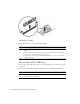
Remove the DVD filler panel.