
Computer Accessories User Manual

6 Sun Fire X4150 Configuration Guide • March 2009
Verify Hard Drives
Use the PCIe HBA’s BIOS utility to verify that the card sees the hard drives.
■ When using the Sun StorageTek (Adaptec) HBA card, you must first initialize the
hard drives using the card’s BIOS (even for single-disk configurations) so the an
OS can see the drives (use the Adaptec-based procedure below). The LSI card
automatically manages this step and does not require manual initialization of
drives (use the LSI-based procedure below).
Adding SAS Hard Drives
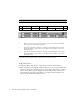
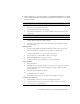
1 Install drives according to the following drive map:
HD1 HD3 HD7 DVD/USB Drive
HD0
HD2 HD4 HD5 HD6
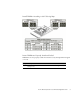
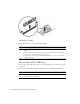
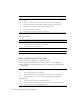
2 Remove protective covers from the connectors on the card and install the HBA
(PCIe SAS 8-port internal disk controller)
*
* Supported HBAs: Sun StorageTek PCIe SAS 8-Port Internal HBA, SGXPCIE8SAS-I-Z, LSI SAS 1068E and Sun
StorageTek SAS RAID 8-Port Internal HBA, SG-XPCIESAS-R-INT-Z, Adaptec/Intel-based
3 Take the free end of the cable that is attached to the disk backplane on the left-
hand side (disks 0-3) and connect it to the Mini-SAS x4 connector on the card
labeled Port 0, 0-3.
4 Take the free end of the cable that is attached to the disk backplane on the right-
hand side (disks 4-7) and connect it to the Mini-SAS x4 connector on the card
labeled Port 1, 4-7.