
User guide

94
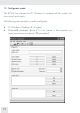
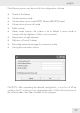
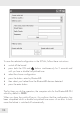
To save the selected configuration in the SCS kit, follow these instructions:
switch off the board •
press both the ON and •
buttons simultaneously for 5 seconds and
until you hear a double low-pitched tone
select the chosen configuration•
press the button: enter by Bluetooth® •
then select your helmet from the Bluetooth® devices detected •
press the enter button •
The first time you do the operation, the computer asks for the Bluetooth® PIN
which by default is 0000.
When you hear the switch-off music, this confirms that the configuration has
been completed whilst a double low-pitched tone warns of an error. In both
cases the helmet is switched off automatically.