Barcode Reader User Manual
Manuals
Brands
Symbol Technologies Manuals
Barcode Reader
MC9000-G
111
112
113
114
115
116
117
118
119
120
Settings
3-13
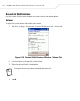
Options
T
o adjust the op
tions for writing and recording:
1.
T
ap
Start - Settings - Personal
tab -
Input
icon -
Options
tab.
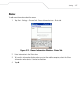
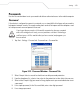
Figure 3-7. Input Window - Options tab
2.
Make the desired changes
to the settings.
3.
T
ap
ok
.
1
...
...
109
110
111
112
113
...
...
484