
Synchro Arts VocAlign Ultra

384kHz and is designed to help with tonally
sensitive sounds.
For pitch, the advanced features include the
Pitch Target knob, which gradually moves from
favouring the Dub to favouring the Guide, and
two pitch matching Algorithms. Algorithm Mode
1 has four settings that dictate pitch target
behaviour. Two of these (Nearest Octave and
Absolute) deliver full-on pitchshifting, and for us
did an impressive job of shifting harmony parts
to match our lead. Next up, Relative imposes the
pitch modulation of the Guide and is ideal for
dialogue matching. Monotone is a more creative
option that shifts to a single designated pitch
(+/- up to 1 octave). Algorithm Mode 2 is
designed speciically for vibrato-heavy sounds.
Finally the Pitch Ranges setting can help focus
the pitch detection algorithm towards speciic
higher or lower ranges for both Guide and Dub.
It’s worth emphasising VocAlign Ultra matches
rather than corrects pitch, so make sure your
Guide is in tune.
Smooth operator
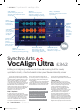
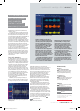
VocAlign Ultra has considerably better visual
feedback than its predecessors and the three
zoomable views – waveform, pitch and signal
energy (which is like the original VocAlign view)
– allow you to see timing and pitch both before
and after processing. The displays also quickly
refresh as you make parameter changes. An
additional bottom panel provides a useful
timeline overview of the captured Guides and
Dubs. As before, the display can be used to add
manual Guide/Dub sync points. You can also use
it to establish protected areas that won’t be
processed and this feature has been upgraded
to support pitch as well as timing, with
independent settings for each. We found the
protected areas particularly handy for more
creative applications.
Whether you’re just trying to ix things or
have more creative ambitions, with more than
60 categorised presets, you can use VocAlign
Ultra without delving too deeply into the
advanced features. In that respect, we managed
to tighten all manner of doubled and layered
vocals. The results were very impressive and in
many cases pleasantly transparent. It’s also very
easy to adjust independently the amount of
timing and pitch correction, and loosening
things a bit is often the key to getting the most
natural results on multiple stacks. On
instruments, particularly more complex ones
with chordal content, it’s much better to stick
solely to timing correction. For monophonic
instruments, we had much success matching
both pitch and timing.
VocAlign Ultra also has enough features to
get creative and the Monotone option, coupled
with some judicious pitch protected sections,
can achieve pretty convincing harmonies.
Meanwhile, both subtle and heavy use of the
Formant Shift can add welcome diferentiation.
VocAlign Ultra is a major step up from
VocAlign Pro, delivering a basket of tools much
closer to their lagship Revoice Pro 4 and results
to match. It’s clearly not cheap and it’s good to
see a rent-to-own scheme that helps spread the
cost. Still, if you do a lot of editing it’ll save you a
lot of time, and that’s worth its weight.
Web synchroarts.com
Info Rent to buy from £85
Verdict
For New timing and pitch algorithms
from Revoice Pro 4
Protected areas for timing and pitch
Impressively transparent results
Multiple ways to tweak outcome
Against Expensive
VocAlign Ultra is an impressive update. Yes
it’s a bit pricey but if you do a lot of editing
and aligning it will improve your
productivity considerably
10/10
Alternatively
Melodyne
230 » 10/10 » From €99
Doesn’t speciically match timing,
but delivers extensive pitch and
timing manipulation/quantising
VocAlign Project
154 » 9/10 » £109
Quick to use and afordable, Project
is deinitely worth considering if
you’re on a tighter budget
There’s no doubt that designing pitch
and timing manipulation plugins that
work successfully and seamlessly
across multiple DAWs is no easy task.
Audio Random Access (ARA), which
was developed by Celemony and
Presonus, makes two-way
communication between plugin and
DAW much slicker and considerably
improves the user experience. That
being said, practical implementation
does vary across diferent DAWs so you
should be sure to follow Synchro Arts’
DAW-speciic instructions.
In VocAlign Ultra ARA has a number
of beneits, not least the fact that you
don’t need to manually capture each
section of audio in real time. With the
ARA plugins loaded in line with your
particular DAW, you simply use the
Capture buttons to assign selected
audio parts as either Guide or Dub. If
you have multiple Dubs to align to the
same Guide, these can be loaded
collectively and accessed from the
same VocAlign Ultra window simply by
selecting their respective tracks.
For multiple Dubs it’s wise to select a
suitable VocAlign preset irst,
otherwise you’ll have to go through
and select the preset individually for
each Dub. Beyond this, any changes to
processing update straightaway and
should you need to swap out or add
further Dubs, these can be captured in
the same way.
Audio Random Access
With the new pitch view it’s easy to see the guide, dub
and inal pitches
VocAlign Ultra works as an ARA version 2 plugin for DAWs that support this format and also as a
regular plugin and as Audio Suite in Pro Tools
“the Monotone option,
with some judicious
pitch protected
sections, achieves
convincing harmonies”
September 2021 / COMPUTER MUSIC / 75
synchro arts vocalign ultra / reviews <
CMU298.rev_VocAlign_Ultra.indd 75CMU298.rev_VocAlign_Ultra.indd 75 23/06/2021 15:1123/06/2021 15:11