
Operator's Manual






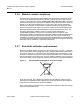
Table Of Contents
- T-Mobile High-Speed Internet Gateway Operator Manual
- 1 Preface
- Table of contents
- List of figures
- List of tables
- 2 ETSI environmental and CRoHS guidelines
- 3 ANSI safety guidelines
- 4 Product description
- 4.1 Product overview
- 4.2 4G/LTE and 5G radio support
- 4.3 4G and 5G band and antenna support
- 4.4 Subscriber Interfaces
- 4.5 Environment
- 4.6 Physical dimensions
- 4.7 Physical interfaces
- 4.8 Typical connection
- 4.9 Mesh Wi-Fi 6 System with the T-Mobile High-Speed Internet Gateway
- 4.10 Management
- 4.11 QR code information
- 4.12 Power
- 4.13 Additional functional and feature information
- 5 Installation
- 5.1 Unpacking the T-Mobile High-Speed Internet Gateway
- 5.2 Product Warnings
- 5.3 Connecting power
- 5.4 Starting up
- 5.5 Downloading the T-Mobile Broadband App
- 5.6 Checking LCD
- 5.7 Connecting to Wi-Fi
- 5.8 Managing the Wi-Fi network
- 5.9 Connecting Accessories (Optional)
- 5.10 Repositioning the T-Mobile High-Speed Internet Gateway
- 5.11 Connecting devices for Wi-Fi or a mesh network
- 5.12 Connecting Ethernet LANs
- 6 Removing battery and SIM card
- 7 Replacing battery and SIM card
- 8 FCC statements and label instructions
- 9 Configuration
- 10 Glossary
- Customer document and product support

T-Mobile High-Speed Internet Gateway Operator
Manual
Issue: DRAFT Nokia 3TG-01275-AAAA-TCZZA 13
List of figures
1 Preface.............................................................................................3
2 ETSI environmental and CRoHS guidelines...............................17
Figure 1 Recycling/take back/disposal of product symbol .......................................19
3 ANSI safety guidelines .................................................................21
Figure 2 Sample safety label- High-Speed Internet Gateway..................................23
4 Product description......................................................................27
Figure 3 The T-Mobile High-Speed Internet Gateway .............................................28
Figure 4 Location of physical interfaces ..................................................................32
Figure 5 Typical connectivity for the T-Mobile High-Speed Internet Gateway.........33
Figure 6 QR code on T-Mobile High-Speed Internet Gateway ................................35
5 Installation.....................................................................................39
Figure 7 Placement of the T-Mobile High-Speed Internet Gateway ........................40
Figure 8 Connecting the power supply to the T-Mobile High-Speed Internet Gateway
42
Figure 9 T-Mobile High-Speed Internet Gateway LCD screen ................................45
Figure 10 5G and 4G connection...............................................................................45
Figure 11 No 5G or 4G signal....................................................................................46
Figure 12 Battery life..................................................................................................46
Figure 13 UPS ...........................................................................................................47
Figure 14 Devices screen showing number of devices to pair .................................47
Figure 15 Charging battery ........................................................................................48
Figure 16 SSID and Password label..........................................................................51
Figure 17 Location of the Gigabit Ethernet LAN ports ..............................................54
6 Removing battery and SIM card ..................................................55
Figure 18 Location of SIM and battery screws ..........................................................57
Figure 19 Bottom of T-Mobile High-Speed Internet Gateway....................................58
Figure 20 Remove bottom cover ...............................................................................59
Figure 21 Location of the Pull Rib for battery ............................................................60
Figure 22 Remove battery .........................................................................................61
Figure 23 SIM finger pull............................................................................................62
7 Replacing battery and SIM card ..................................................63
Figure 24 SIM tray .....................................................................................................66
8 FCC statements and label instructions ......................................67
9 Configuration ................................................................................69
10 Glossary ........................................................................................91