
Operator's Manual
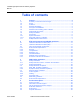
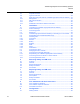
Table Of Contents
- T-Mobile High-Speed Internet Gateway Operator Manual
- 1 Preface
- Table of contents
- List of figures
- List of tables
- 2 ETSI environmental and CRoHS guidelines
- 3 ANSI safety guidelines
- 4 Product description
- 4.1 Product overview
- 4.2 4G/LTE and 5G radio support
- 4.3 4G and 5G band and antenna support
- 4.4 Subscriber Interfaces
- 4.5 Environment
- 4.6 Physical dimensions
- 4.7 Physical interfaces
- 4.8 Typical connection
- 4.9 Mesh Wi-Fi 6 System with the T-Mobile High-Speed Internet Gateway
- 4.10 Management
- 4.11 QR code information
- 4.12 Power
- 4.13 Additional functional and feature information
- 5 Installation
- 5.1 Unpacking the T-Mobile High-Speed Internet Gateway
- 5.2 Product Warnings
- 5.3 Connecting power
- 5.4 Starting up
- 5.5 Downloading the T-Mobile Broadband App
- 5.6 Checking LCD
- 5.7 Connecting to Wi-Fi
- 5.8 Managing the Wi-Fi network
- 5.9 Connecting Accessories (Optional)
- 5.10 Repositioning the T-Mobile High-Speed Internet Gateway
- 5.11 Connecting devices for Wi-Fi or a mesh network
- 5.12 Connecting Ethernet LANs
- 6 Removing battery and SIM card
- 7 Replacing battery and SIM card
- 8 FCC statements and label instructions
- 9 Configuration
- 10 Glossary
- Customer document and product support

2
T-Mobile High-Speed Internet Gateway Operator
Manual
Nokia 3TG-01275-AAAA-TCZZA Issue: DRAFT
Nokia is a registered trademark of Nokia Corporation. Other products and company
names mentioned herein may be trademarks or tradenames of their respective
owners.
The information presented is subject to change without notice. No responsibility is
assumed for inaccuracies contained herein.
© 2020 Nokia.
Contains proprietary/trade secret information which is the property of Nokia and must
not be made available to, or copied or used by anyone outside Nokia without its
written authorization. Not to be used or disclosed except in accordance with
applicable agreements.