
Operator's Manual
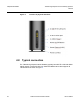
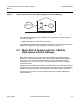
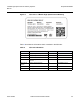


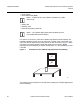
Table Of Contents
- T-Mobile High-Speed Internet Gateway Operator Manual
- 1 Preface
- Table of contents
- List of figures
- List of tables
- 2 ETSI environmental and CRoHS guidelines
- 3 ANSI safety guidelines
- 4 Product description
- 4.1 Product overview
- 4.2 4G/LTE and 5G radio support
- 4.3 4G and 5G band and antenna support
- 4.4 Subscriber Interfaces
- 4.5 Environment
- 4.6 Physical dimensions
- 4.7 Physical interfaces
- 4.8 Typical connection
- 4.9 Mesh Wi-Fi 6 System with the T-Mobile High-Speed Internet Gateway
- 4.10 Management
- 4.11 QR code information
- 4.12 Power
- 4.13 Additional functional and feature information
- 5 Installation
- 5.1 Unpacking the T-Mobile High-Speed Internet Gateway
- 5.2 Product Warnings
- 5.3 Connecting power
- 5.4 Starting up
- 5.5 Downloading the T-Mobile Broadband App
- 5.6 Checking LCD
- 5.7 Connecting to Wi-Fi
- 5.8 Managing the Wi-Fi network
- 5.9 Connecting Accessories (Optional)
- 5.10 Repositioning the T-Mobile High-Speed Internet Gateway
- 5.11 Connecting devices for Wi-Fi or a mesh network
- 5.12 Connecting Ethernet LANs
- 6 Removing battery and SIM card
- 7 Replacing battery and SIM card
- 8 FCC statements and label instructions
- 9 Configuration
- 10 Glossary
- Customer document and product support

T-Mobile High-Speed Internet Gateway Operator
Manual
ChapterTitleVariable
Issue: DRAFT Nokia 3TG-01275-AAAA-TCZZA 37
•
radio - Wi-Fi (LAN-side) features Mesh Wi-Fi 6 system
• power classes:
• Power class 2 (26 dBm) at LTE B41
• Power class 3 (23 dBm) at all other bands.
• security features:
• adheres to strict Nokia security standards
• WPA support including WPA-PSK, WPA2, WPA3
• only advertises and accepts TLS/HTTPS
• certifications:
• FCC EMC
• FCC 4GLTE RF bands: B12, B71, B5, B26, B2, B4, B66, B48, B25, B41, B46 LAA
• FCC 5G NR RF bands: n2, n41, n25, n71, n66
• FCC RF 2.4GHz Wi-Fi
• FCC RF 5GHz Wi-Fi
• FCC RF BT
• FCC RF SAR
• ETL Safety
• IEEE1725
• PTCRB
• WFA, Prop65
• OS supports 64-bit architecture.
• Two liquid damage indicator (LDI) sticks pasted in the T-Mobile High-Speed
Internet Gateway:
• On the side of the inner frame close to the vents
• On the bottom door, which is attached with screws