
User's Manual




Chapter 1 Get Started
5
Charge the Battery
Charge your battery fully (about 4 hours) before
using the Smartphone. You may connect your
Smartphone to an electrical outlet by using the
adapter or connect your Smartphone to a PC by
using a Mini USB cable.
NOTE: The time it takes for a battery to be fully
charged depends on the environment temperature at
the time of charge; a full charge normally takes about
3.5-4 hours under 0-10 degree temperatures, and
below 3 hours for temperatures ranging from 20-45
degrees.
Mode Estimated battery life
Talk time 3.5 to 4 hours
GPRS Up to 2 hours
Standby 200 hours
Fully charge the new battery before using your
Smartphone for the first time. When the low-battery
message appears, save any unsaved data you are
working on then switch off the Smartphone. Do not
restart your Smartphone until you have connected it to
an external power source or connect to a PC’s USB
port.
NOTE: Do not leave your Smartphone connected to a
charger for longer than a week because overcharging
can shorten a battery’s lifespan. Your battery will
automatically discharge when the device is not in use.
Leaving the battery in exceedingly hot or cold places
may also reduce its capacity or shorten its lifespan.
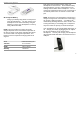
Your Smartphone can be charged while switched on or
off. Charge your battery by plugging the AC adaptor
into the mini USB port on the left side of the
Smartphone. You may also charge your Smartphone
using the Mini USB cable while connected to the PC’s
USB port.