
Operation Manual

Playback
Enjoying music with DLNA
Playback
Enjoying music with DLNA
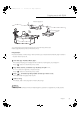
You can play back music stored on the SSD of this unit with the DLNA function.
≥ About supported format, refer to “File format” (@ 31)
Preparation
≥ Connect the device on which the app “Technics Music App“ is installed and the network player or tablet to
the same network as this unit.
1 Start the app “Technics Music App”.
≥ If a screen prompting you to display the menu screen for ST-G30 appears, tap “Display On“.
≥ Tap “ “ to return to the “Music Source“ screen.
2 Tap “Music Server“, and then tap “Technics ST-G30******“.
≥ “******“ stands for a digit that is unique to each set.
≥ Tap “ “ to return to the “Music Source“ screen.
3 Tap “ “, and then tap the speaker set that you want to use.
≥ A model number will appear under “DLNA“.
4 Select a song.
≥ For details, refer to the user guide for “Technics Music App“.
お知らせお知らせ
Note
≥ Depending on the contents and the connected equipment, operations or playback may not be possible.
Network player, etc
21
ST-G30-SQT1219_mst.book 21 ページ 2016年1月28日 木曜日 午後6時30分