
product image) Manual


Instruction Manual αlpha CON 2000
30
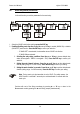
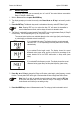
6.9 Measuring range selection (RANG) sub-function
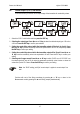
In this sub-function you select the measuring range.
SETUP
SETUP
SETUP
SETUP
SETUP
SETUP
SETUP
SETUP
HOLD
HOLD
HOLD
HOLD
HOLD
HOLD
HOLD
HOLD
µS
µS
µS
µS
mS
mS
mS
4
1
2
3
4
5
6
7
1
2
2
2
2
2
ENT
ENT
ENT
ENT
ENT
ENT
ENT
ENT
2
2
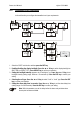
Measuring ranges: No. Measuring range Resolution
1 0.000 to 2.000 µS/cm 0.001 µS/cm
2 0.00 to 20.00 µS/cm 0.01 µS/cm
3 0.0 to 200.0 µS/cm 0.1 µS/cm
4 0 to 2000 µS/cm 1 µS/cm
5 0.00 to 20.00 mS/cm 0.01 mS/cm
6 0.0 to 200.0 mS/cm 0.1 mS/cm
7 0 to 1000 mS/cm 1 mS/cm
Relative accuracy: ±1 % of full scale reading (±2 % >500 mS/cm)
System accuracy: The effective measuring range and the total system accuracy depend on the
sensor used with the transmitter. Please refer to the respective sensor
documentation.
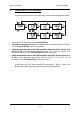
Press the ENT key to confirm your selection.
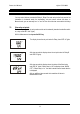
Continue with rest of the Setup procedures by pressing ▲ or ▼ key or return to the
Measurement mode by pressing the ▲ and ▼ key (escape) simultaneously.
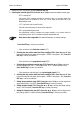
1. Select the “RANG” sub-function and then press
the ENT key.
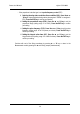
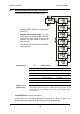
2. Selecting the measuring range: The upper
display shows the currently selected measuring
range and the lower display shows the cell
constant. The range number is displayed at
lower left corner.
Press the ▲ or ▼ key to select the requested
measuring range.