
User manual




Web server • LAN GATEWAY 9
English
USER ACCESS
The language for web server can be selected at the top right side of the window, by clicking on the relevant item. Available languages:
English, Italian, German, French.
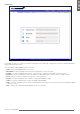
Here described the LAN GATEWAY web server structure:
Ho m e• : it shows LAN GATEWAY web server structure
me a s u r e m e n t s• : it allows to display all measured values read from the connected counter
Co u n t e r s• : reserved to the Administrator. For the connected counter, it allows to start/stop/reset partial counters
re C o r d i n g s• : it allows to download the measurement data recording. Administrator can also enable recording or delete it
st a t u s• : it allows to read the information relevant to the connected counter
se t t i n g s• : reserved to the Administrator. It allows to change LAN GATEWAY settings
up d a t e• : reserved to the Administrator. It allows to upgrade LAN GATEWAY
us e r s• : reserved to the Administrator. It allows to manage Administrator and User accounts (Username, Password) and to add up
to 20 User accounts
He l p• : it shows a link to download LAN GATEWAY web server user manual