
User's Manual

39
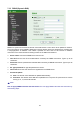
7.3.3 DDNS (Dynamic DNS)
DDNS is a system which allows the domain name data held in a name server to be updated in real time.
The most common use for DDNS is allowing an internet domain name to be assigned to a computer with
a varying/dynamic IP Address. This makes it possible for other sites on the internet to establish
connection to the machine without needing to track the IP Address themselves.
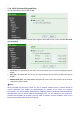
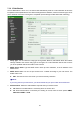
¾ Server name: Choose the DDNS Server from the list.
¾ User ID: Enter the user ID for authentication necessary for DDNS connections. Type it up to 64
characters.
¾ Password: Enter the password for authentication necessary for DDNS connections. Type it up to 32
characters.
¾ Re- type password: Re-type the password to confirm.
¾ Host name: Enter the host name that is registered to the DDNS server.
¾ Periodical Update:
z Auto: The domain name data will be updated automatically.
z Periodical: The domain name data will be updated once in a period. The period can be chosen
among 5, 10, 15, 30 and 60 minutes.
)
Note:
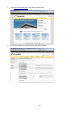
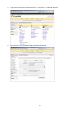
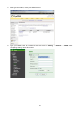
How to apply DDNS username and Host name? You can apply DDNS username and Host name by
the following steps: