
USER GUIDE Managed, High-Speed Network Modem XL-12000S




XL-12000S
MANAGED, HIGH-SPEED NETWORK MODEM USER GUIDE
38 TUT SYSTEMS 7.0 CONFIGURE THE MODEM
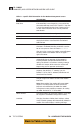
FIELD DESCRIPTION
Subnet Mask: A mask selected by the Network Administrator to provide
(LAN and DSL) a specific subset of address numbers. A valid subnet
mask is required for routing options 2 or 3. Enter 0.0.0.0
for default subnet mask setting. This address is used for a
remote management session to the modem.
DSL IP Address: A unique address number supplied by the Network
(Right side of screen) Administrator for the DSL side of the modem. A valid DSL
IP Address is required for routing options 2 or 3. This
address can also be used for remote management when
opening a Telnet session to the modem.
Static Routing Table:
Destination: IP address of the destination (host or network).
A destination address of 0.0.0.0 designates the default
gateway entry.
Mask: Subnet mask address. A mask selected by the Network
Administrator to provide a specific subset of address
numbers.
Gateway: IP Address of the next router, which may be an external
router or the other modem across the DSL link.
Hops: Number of routers between this network and the
external gateway router.
Note: Unused routing table entries are deleted by
entering a zero (or blank) hop count. Only entries with
a non-zero hop count are used. Static routing entries
do not affect bridging. Entering a zero and pressing
<Enter> will cause the entire route to be deleted.
Back to Table of Contents