
USER GUIDE Managed, High-Speed Network Modem XL-12000S


XL-12000S
MANAGED, HIGH-SPEED NETWORK MODEM USER GUIDE
9.0 MODEM STATISTICS TUT SYSTEMS 49
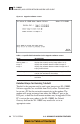
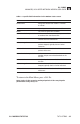
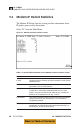
Table 9.1 Specific field information for the Modem Status screen.
FIELD DESCRIPTION
Master/Slave: Designates whether the modem is a Master
or a Slave.
State: Operating status of DSL line. Connect/disconnect.
Name: The name assigned to the modem.
Network Statistics Bytes Total: Modem LAN: Number of Ethernet bytes transmitted
or received from the Ethernet link.
Packets Total: Number of Ethernet packets transmitted or
received from the Ethernet link.
Packets Dropped: Number of transmitted or received Ethernet
packets dropped, typically due to a lack of
resources.
Packets with Errors: Number of transmitted/received Ethernet
packets with errors.
Network Statistics Bytes Total: Modem DSL:
Number of bytes transmitted/received on the
DSL line.
Packets Total: Number of packets transmitted/received on the
DSL line.
Packets Dropped: Number of transmitted/received DSL packets
dropped, typically due to a lack of resources.
Packets with Errors: Number of transmitted/received DSL packets
with errors.
To return to the Main Menu, press <Ctrl-X>.
Note: Staying in the screen for prolonged periods of time may degrade
performance during heavy use.