
User manual



DIGITAL TERRESTRIAL TERMINAL
USER MANUAL
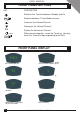
FRONT PANEL BUTTONS
KEY DESCRIPTION
Switches the Terminal between Standby and On.
Switches between TV and Audio services.
Increases the Volume/Channel.
Decreases the Volume/Channel.
Selects the Volume or Channel.
When pressed together, resets the Terminal. Use only
when the Terminal stops responding to the RCU.
P/V
TV
TV
and
FRONT PANEL DISPLAY
DTT in standby.
24hr clock displayed.
Service No.53 selected.
Green light-Audio service
selected.
Rotating bar-searching for
service information.
Four flashing bars and red light.
Service not found/poor signal.
Yellow light. Mail message
Red light. Error indication.
Menu selected.
12