
User's Manual




4
INSTALLATION
TRANSMITTER
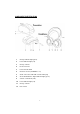
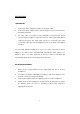
1. Connect the mains adapter provided to an electrical outlet.
2. Connect the mains adapter cable to the DC IN input connector located on the
transmitter rear panel.
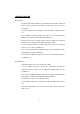
3. An audio cable is provided from the transmitter rear panel that can be
connected to the headphone output jack of TV set, Hi-Fi system, VCR, MP3 or
radio-cassette player. The audio cable can also be connected to the audio
source with output jack (Left and Right) by means of the RCA socket adaptor
provided.
The red Power Indicator will light up as soon as you have connected the power
adapter to the mains outlet. Transmitter will automatically switch OFF in four
minutes if there is no audio signal can be detected. However, transmitter will
automatically switch ON once audio signal can be detected.
RECEIVER HEADPHONES
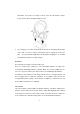
1. Move out the earpad holder from the right hand side (R) of receiver
headphones.
2. Insert two rechargeable LR03/AAA size batteries, and ensure batteries have
inserted correctly according to the polarity.
3. Put back the earpad holder to the right hand side of receiver headphones.
4. Switch off the receiver headphones and place it into the transmitter to charge
the batteries before the first use. Headphones will be fully charged in
approximate of six hours.