
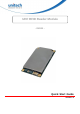
Quick Start Guide



5
© 2022 Unitech Electronics Co., Ltd. All rights reserved.
Unitech is a registered trademark of Unitech Electronics Co., Ltd.
All product and company names are trademarks, service marks, or registered trademarks of their respective owners
Connecting the RM100 to a PC
Before operating the Indy tool software for development of the RFID device, follow the steps
made below to connect the RM100 to a PC.
1.
Install the Indy tool on your PC.
2.
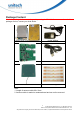
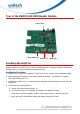
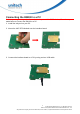
Mount the UHF RFID Module onto the interface board.
3.
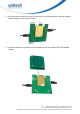
Connect the interface board to a PC by using a micro USB cable.